Showing posts with label others. Show all posts

Friday, July 11, 2008

KVM Virtualization solution to be tightly integrated with Linux kernel 2.6.20

There is good news on the horizon... which is that Linus Torvalds has merged the KVM code - which is the Kernel Virtual Machine Module in the kernel source tree leading to Linux Kernel 2.6.20. This opens up a lot of avenues as far as Linux is concerned. Using KVM, it is possible to run multiple virtual machines running unmodified Linux or Windows images.

KVM is not the only technology that is around as far as Linux is concerned. But its advantage over other similar technologies is that it is a part of Linux and uses the regular Linux scheduler and memory management which in turn makes it much smaller and simpler to use. It uses slightly modified userland tools that comes bundled with QEMU to manage virtual machines. But the similarity ends there as QEMU inherently uses emulation where as KVM makes use of processor extensions for virtualization.

A normal Linux process has two modes of execution - which is the Kernel mode and the User mode. When you use KVM, Linux will have an additional mode which is the guest mode which in turn will have its own kernel and user modes (see figure below).

On the down side, for KVM to function properly, your computer should have Intel or AMD processors which supports integrated virtualization technology in the hardware level.

Free Open Document label templates from Worldlabel

The regular readers of this blog will remember me mentioning a competition being conducted by Worldlabel.com in conjunction with the OpenOffice.org documentation project for creating Open Source templates. Guess what..., On the eve of the New Year, they have released the winning template which is a Thesis template for OpenOffice.org Writer designed by Matthias Ansorg. This template won the first place for its overall detail, comprehensiveness, complexity and use of different elements and functions.

Worldlabel is synonymous with creating labels in a variety of shapes and sizes for ones use which includes those for CD/DVDs, video, mailing, diskettes and shipping. And Worldlabel lets you download a set of free templates for designing and drawing labels in OpenOffice.org format and that too in both A4 and A5 paper sizes. In fact, the templates are available in XML Open Document Format (ODF) apart from Word and PDF and are released in the public domain, licensed under GPL.

At this stage some of you might wonder why you need a template for creating a seemingly simple task as printing labels. In the past, I have spent a couple of hours doing mailings and I can vouch for the fact that at the least, in many cases, it has been a hit and miss affair with the printer printing the addresses outside the label borders. And at the end of all that time and effort spent, I was left holding a couple of label sheets which had the addresses printed in a skewed manner.

The problem is that spacing for your label documents has to be extraordinarily precise to make sure that the text is printed exactly where it needs to be and if there is any difference in the spacing, then the text will overflow the labels when printed.This is where templates come into the picture. Using ready made templates such as the ones from Worldlabel which are provided free of cost and released under a Free license, it is possible to get the printing right each and every time thus minimizing the wastage of paper and ones efforts.

Fig: Worldlabel.com site has lots of Free label templates for OpenOffice.org

Using Worldlabel templates in OpenOffice.org is easy. It involves first downloading the templates from their website and saving them in a folder in your machine. Worldlabel has made it possible to download individual templates in Open Document Format or all of them at a stretch as a compressed archive. In the latter case, you download it and unpack the archive in a directory of your choice. I decided to download all the templates at one stretch and so selected the archive. And I created a directory named "oOTemplates" in my Home directory ( /home/ravi ) and unpacked all the templates into it.

The next step is to import the templates residing in the "oOTemplates" directory into OpenOffice.org so that they can be used to create the labels of the desired dimensions.

Fig: Importing the templates into OpenOffice.org

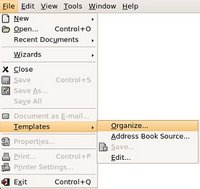
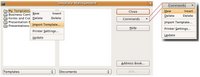
There is a simple way of importing the templates into OpenOffice.org; which is to open OpenOffice.org and navigate to 'File -> Templates -> Organize' which will open the "Templates Management" dialog. This dialog contain two panes namely the template pane and documents pane. Right clicking on any folder in the template pane and selecting 'New' will create a new folder for which you can give any name of your choice (See figure below). Since I was importing Worldlabel templates, I named the folder worldlabel. Now right clicking on the just created worldlabel folder in the template organizer and selecting 'Import' opened the file open dialog and I was able to import the Worldlabel templates which I had saved previously in the 'oOTemplates' directory.

Fig: Import the templates via the template management dialog

From here on, to use a template, all I need to do is select 'File -> New -> Templates and Documents' which will open the template dialog and I can select the template of my choice and start working in it. You will find a detailed article on using and customizing OpenOffice templates at the following link.

With Linux and Open Source gaining momentum, more and more business houses are realizing the advantages of embracing open file formats for their documents. And Worldlabel through its efforts in releasing top quality label templates in the public domain and also by taking the initiative to promote a competition to create the best template for OpenOffice.org office suite is pulling all stops to see that there is enough public awareness about the advantages of using Open Source software in general and open file formats in particular.

New Year 2007 - The year of GNU/Linux

Today is the dawn of a new year, the year 2007. Every year, we wish, hope and dream that it will be the year when GNU/Linux will gain critical mass appeal - not that it has failed to significantly widen its base. One of the most endearing aspect of GNU/Linux for me over and above the ideological considerations is its simplicity.

A couple of years back, when I was yet to be introduced to Linux, I remember having faced many situations when my OS (Windows 98) had died on me for no apparent reason and I was left staring at the blue screen of death. The outcome being doing a clean re-install of Windows. From those experiences, I realized that the Windows was a complex beast especially when it came to troubleshooting problems. Compared to that, troubleshooting in GNU/Linux is akin to a piece of cake or a walk in the park.

The inherent strength of GNU/Linux lies in the fact that all the configuration pertaining to the OS is saved in liberally commented text files which reside in a specific location. And almost all actions executed by the OS is logged in the appropriate files which are also plain text files. For example, reading the file /var/log/messages will reveal a wealth of knowledge about the actions carried out by the OS and the errors if any during boot-up. So once the initial learning curve is overcome, it becomes a joy to work in GNU/Linux.


Some time in 2007, we can hope to see KDE 4.0 released. Already, when I compare KDE 3.5 with older versions, I have found significant increase in speed with which applications start up. KDE 4.0 is expected to be much more snappy as it is developed using Qt 4.0 library and will contain a lot of additional features. Of course, this year Microsoft is also officially releasing its new OS Vista. But many reviews indicate that there are lots of shortcomings in Microsoft's latest offering and the general opinion is that it is not worth its price tag.

I am not trying to disparage Microsoft but when you have a fabulous choice in GNU/Linux which comes with an unbeatable price tag (Free) and if you are able to do almost all your tasks in GNU/Linux baring say playing some of your favorite games, why would you consider buying another OS paying hundreds of dollars ? More over if you are an avid gaming enthusiast, you should rather be buying a Sony PlayStation or a Nintendo Wii or even an XBox and not an OS.

There was a time when I used to boot into Windows to carry out certain tasks. But for the past many months, I have realized that I am able to do all my tasks from within GNU/Linux itself and it has been some time now since I have booted into Windows.

But when we look back, Linux or rather GNU/Linux the OS has done quite well in 2006. With many popular distributions opting for a 6 Month release schedule, we get to try out at least two versions each of many distributions each year. More over, we get the latest software too. Other than that, in 2006 we also saw the open source release of Java code by Sun Microsystems - a great victory for Free software enthusiasts. The Linux BIOS project also got its share of publicity with many hardware manufacturers evincing interest in the project. So in many ways I look forward to an exciting year 2007 for GNU/Linux, Open Source and Free Software. And as always (lets hope) 2007 is going to be the Year of GNU/Linux.

On this positive note, I wish you all a very happy and prosperous New Year.

How to get a Windows Tax Refund

Ever wonder how Microsoft got so rich ? Yes, I can visualize you pointing to their flagship OS Windows. But it is not as simple as it looks. A major portion of Microsoft's revenue through sale of its OS comes from deals struck with various hardware vendors. The revenue it gets through sale of boxed versions of Windows is only a tiny minuscule percentage when compared to the money it gets through OEM deals. So when you go out to buy a computer especially from an established PC manufacturer, in majority of cases, you have no choice but get it pre-loaded with Windows. And even if you do not want Windows and intend to run some other OS, you end up paying for a copy of Windows.

In India at least, the situation is some what different because the assembled computer market is thriving and many people choose an assembled computer over a branded computer. But what do you do if you do not want to pay for a copy of Windows OS while buying a branded PC when you are sure that you intend to run Linux on it ? You can do what Serge Wroclawski did. With a good dose of patience, perseverance and good luck, he was able to get back over $52.00 - the price of an OEM version of Windows - which he was charged while buying a Dell PC

Introducing the new Nokia N800 Internet Tablet - powered by Linux

Many news sites are abuzz about the new Nokia offering in the form of an Internet tablet named N800. Previously, I had written about the Nokia N770 which is the predecessor of N800. Nokia has reportedly added a number of enhancements to N800 which are lacking in its predecessor such as an integrated web cam, better style, enhanced hardware specs such as more processing power and more memory, two full sized SD card slots and more. But the one thing which attracts me to this mobile device is that it is powered by Linux.

The approximate hardware specifications of N800
  • CPU speed - 320 MHz
  • Screen size - 4.1 inches
  • Screen resolution - 800x480
  • Memory - 128 MB
  • Flash Memory - 256 MB
  • Weight - 215 Gms
  • Web cam
  • Stereo speakers
  • Touch screen
  • Powered by Linux
  • Price : Yet to be known.

Fig: Nokia N800 Internet Tablet and accessories

Fig: N800 and N770 side by side (Courtesy: John Tokash)

Already a number of people who are passionate about this new Nokia offering have shared their first hand experiences. The foremost being John Tokash who has provided a very good video of N800 which you can view here - do watch the video, you will be impressed.
Also a person going by the pseudo name 'thoughtfix' has been blogging about all aspects of Nokia's internet tablet both N770 and the new N800 which also provides a lot of details about this device.

Updates will be added as and when they are available.

Status of the OLPC project

It seems the One Laptop Per Child project which aims to provide a very cheap, child friendly laptop powered by Linux for each child in the third world countries is making steady progress. The design of the laptop has been finalized and a couple of prototypes have already found its way into the hands of a select few in the media who have come out with a review of the laptop.

To the uninitiated, the One Laptop Per Child project popularly known as OLPC is the brain child of Nicholas Negroponte who is also the chairman of this project. The aim is to provide a laptop to each child in developing nations so that they can harness the power of IT to further their education. As of now, the laptop will cost a little more than $100 but in a couple of years, the price is expected to come down to say $50.

The OLPC website states that the "laptop will be Linux-based, with a dual-mode display, both a full-color, transmissive DVD mode, and a second display option that is black and white reflective and sunlight-readable at 3× the resolution. The laptop will have a 500MHz processor (As of now, it is actually 377 MHz AMD processor) and 128MB of DRAM, with 500MB of Flash memory; it will not have a hard disk, but it will have four USB ports. The laptops will have wireless broadband that, among other things, allows them to work as a mesh network; each laptop will be able to talk to its nearest neighbors, creating an ad hoc, local area network. The laptops will use innovative power (including wind-up) and will be able to do most everything except store huge amounts of data".

The manner in which the power is to be generated is yet to be finalized. But it seems a lot of ideas are being generated.

James Tuner has compiled a detailed report of the status of the OLPC laptop prototype after taking it for a test drive. He has also provided photos of the final prototype which is named "XO". He notes that (as of now) the power for the laptop will be generated using a "Yo-Yo like device that can be pulled by hand or foot" instead of a hand crank. And the "peak power consumption will be around 5 Watts for high-demand media applications" with it falling down to a mere 350 Milli-watts for just keeping the mesh network alive.

A month back, HÃ¥kon Wium Lie of Opera Software had shared his thoughts on OLPC machine, where he explained how he installed and ran the Opera web browser on this laptop.

A number of developing countries have signed up for this unique project which aims to sell the laptops only to governments which in turn will be distributing the laptops to the children in schools. But unfortunately, the Indian government has not shown as much interest in the project stating that this money could be better utilized else where. As of now, India is taking a wait and watch attitude. Perhaps we Indians could see this laptop once the price comes down to an expected $50 in a couple of years time from now.

traceroute - a very useful troubleshooting tool which reveals the bottlenecks on the Internet.

I am sure anyone who is at the least Internet savvy, will be aware that to move data from one point say A to another point B across the Internet, it has to pass through a number of intermediary points say C, D,E.... But what many won't know is that your data is not transferred in one piece when it is sent over the net, rather, it is split into chunks of say 1500 bytes each, then each chunk is enclosed in what is known as a packet which contain some additional data such as the destination IP address and port number apart from some other details which provide the unique identity to the packet and finally it is sent across the net.

While the packets travel the path from point A to point B, each packet may take a different path depending upon diverse factors and eventually they are merged together in the same order at the receiving end to provide the document you sent in the first place.

The intermediate gateways through which the packets pass through before they reach the final destination are known as hops. So for data to travel from point A to point B on the net, it has to go through a number of hops.

Linux & Unix being network operating systems have a number of powerful tools which aid the network administrator to find out a wealth of data about their network and the Internet. One such tool is the ubiquitous traceroute.

The tool traceroute is available in all Unix and Linux distributions and is used to find out the potential bottlenecks in between your computer and a remote computer across the net. The usage of this tool is quite simple and is as follows:
# traceroute 
Usually you have to be root to run this tool as it resides in the /usr/sbin directory. But if you use the full path, then you can run this tool as a normal user as follows:
$ /usr/sbin/traceroute 

For example, this is the output I received when I ran a trace on the www.yahoo.com domain from my machine.
$/usr/sbin/traceroute www.yahoo.com

traceroute to www.yahoo.com (69.147.114.210), 30 hops max, 40 byte packets
1 10.2.71.1 (10.2.71.1) 21.965 ms 22.035 ms 22.111 ms
2 (ISP) (ISP gateway) 22.510 ms 25.716 ms 26.073 ms
3 61.246.224.209 (61.246.224.209) 69.212 ms 59.778 ms 63.334 ms
4 59.145.6.1 (59.145.6.1) 65.632 ms 64.750 ms 64.868 ms
5 59.145.11.69 (59.145.11.69) 63.562 ms 64.219 ms 63.742 ms
6 203.208.143.241 (203.208.143.241) 318.632 ms 307.733 ms 316.650 ms
7 203.208.149.25 (203.208.149.25) 317.534 ms 308.116 ms 307.507 ms
8 203.208.186.10 (203.208.186.10) 245.835 ms 247.878 ms 248.862 ms
9 so-1-1-0.pat1.dce.yahoo.com (216.115.101.129) 286.774 ms 289.702 ms so-1-1-0.pat2.dce.yahoo.com (216.115.101.131) 326.470 ms
10 ge-2-1-0-p141.msr1.re1.yahoo.com (216.115.108.19) 324.044 ms 324.497 ms 326.011 ms
11 ge-1-32.bas-a1.re3.yahoo.com (66.196.112.35) 333.479 ms 333.019 ms ge-1-41.bas-a2.re3.yahoo.com (66.196.112.201) 292.967 ms
12 * * *
13 * * *
14 * * *
15 * * *
.
. //Truncated for brevity
.
29 * * *
30 * * *
As you can see from the output spewed by traceroute, it defaults to a maximum of 30 hops. The first line of the output gives the IP address of the yahoo.com domain which is 69.147.114.210, the maximum number of hops traceroute will keep track of the packets before it reaches the destination and the size of the packets which is 40 bytes.

The next 30 or so lines show the IP address or domain name of the gateway servers through which the packets pass through as well as the time in milli-seconds of the ICMP TIME_EXCEEDED response from each gateway along the path to the host. traceroute program utilizes the IP protocol's time to live (TTL) field. By default, it starts with a TTL value of 1 but this value can be changed with the -f option.

Now lets take a closer look at the output of traceroute to the yahoo.com domain as shown in the listing above. As you can see, the second hop is always to ones ISP's gateway as shown by the address (I have removed the address of my ISP's gateway). On the same line, followed by the IP address, there are three time values in milli seconds. There are three values because traceroute by default sends simultaneously, 3 packets of 40 bytes each. And the three time values are the time taken to send the packets and receive a ICMP TIME_EXCEEDED response from the gateway. Put another way, these three values are the round trip times of the packets. So for the three packets to reach my ISP's gateway, and get an echo back, it takes 22.510 milli seconds, 25.716 ms and 26.073 ms respectively as is displayed by the values of the 2nd hop.

Lets look at the 5th and 6th hop in the output above. If you compare the times, you will find a drastic increase in the times. If it is 63.562 ms for the 5th hop, it is 318.632 ms for the 6th hop. This is because up till the fifth hop, the gateway servers were within the Indian sub-continent itself. Where as the gateway of the 6th hop is in Singapore and so it takes that much more time to get a reply. Generally, smaller numbers mean better connections.

Check out the 11th hop. It shows two domains with one domain for the first two packets and a different domain for the third packet.

And from 12th hop onwards I get a series of time outs as shown by the asterisks. So my trace of the www.yahoo.com domain resulted in a series of time outs and did not complete. The problems could be one of the following:
  • The network connection between the server on the 11th hop and that on 12th hop is broken.
  • The server on the 12th hop is down.
  • Or there is some problem with the way in which the server on the 12th hop has been setup.
To make sure, I did a ping of the www.yahoo.com domain and as expected, I received 100% packet loss as shown by the ping output below.
$ ping -c 2 www.yahoo.com
PING www.yahoo-ht2.akadns.net (69.147.114.210) 56(84) bytes of data.

--- www.yahoo-ht2.akadns.net ping statistics ---
2 packets transmitted, 0 received, 100% packet loss, time 1009ms
Usually this means I will not be able to access the concerned domain. But in yahoo.com's case, I was able to access the domain without any problem as in all probability, their website is mirrored across a number of servers spread across the world. So if one server is down, the query is re-routed to the next nearest server.

traceroute is a very useful tool to pin-point where the error occurs on the internet. It can also be used to test the responsiveness of a domain or server. For example, If your route to a server is very long (takes over 25 hops), performance is going to suffer. A long route can be due to less-than-optimal configuration within some network along the way.

Similarly, if you see in a trace output, a large jump in latency (delay) from one hop to the next, that could indicate a problem. It could be a saturated (overused) network link; a slow network link; an overloaded router; or some other problem at that hop. It can also indicate a long hop, such as a cross-country link or one that crosses an ocean (compare the timing of the 5th and 6th hop in the yahoo.com trace output above).

CNR for all - An easy way of installing software on any Linux distribution with just a few clicks

Linspire is synonymous with the popular CNR ("Click 'N Run") software where you download a package of your choice from the Linspire CNR store and install it just like you do in Windows - that is by double clicking on it. The CNR warehouse has a collection of over 20,000 Linux packages, libraries and products, some of them commercial products like Win4Lin Pro, CodeWeavers' CrossoverOffice and TransGaming's Cedega which are made available to the Linspire / Freespire users. And the users can search for applications by title, popularity, user rating, category, function, or author.

Till now CNR contained software primarily for Linspire or Freespire Linux distribution users. But Kevin Carmony - the President and CEO of Linspire Inc who operates the CNR repository has now made public, his intension of supporting all other Linux distributions via its CNR one click install software.

Just to bring it in perspective, consider this scenario... At present, if you are a Slackware Linux user and you want to install say, GNUCash - a financial software, there is no easy way of installing it other than downloading and compiling the source of GNUCash and all its library dependencies. This is because the Slackware distribution does not support Gnome or GTK2 based software and so the official Slackware repository does not offer a compiled version of GNUCash.

With CNR supporting all Linux distributions, it will be possible to download the GNUCash binary from the CNR website and install and run it on Slackware with just a couple of clicks. It will be easy to upgrade any software to the latest version with ease. Finally, we will have a process of installing software using the CNR installer, just like you do it in Windows, that too for any Linux distribution.

Fig: The CNR warehouse with the software packages divided into categories

Kevin Carmony claims CNR does dozens of things to make finding, installing and managing software on your desktop computer extremely easy. For example, it is very easy to find the right piece of software with user reviews, charts, screenshots, descriptions, friendly names, and so on. Once you've found what you're looking for; with literally one click, the software is installed to your computer and icons added to your desktop and Launch Menu. CNR then notifies you when updates are available, which you can then install with one click. With this anouncement, CNR now has a new website at CNR for all.

AmaroK - A versatile music player for GNU/Linux

I was always of the impression that the function of a music player was little more than playing music. That impression took a beating when I tried a versatile music player called AmaroK. This music player is developed specifically for the KDE environment but can also be used in other window managers. What is unique about this music player is that it supports a wide variety of features apart from playing music.

I am not a keen connoisseur of music. But I do enjoy listening to certain kinds of music. My taste in music is driven by the rhythm of the music rather than its lyrics. So even if there is no meaning to the song but is pleasing to my ears, then I tend to enjoy it more. When ever I come across songs that I truly like, I usually rip them from my audio CD and save them on my computer so that I do not have to pop in the CD each and every time I want to listen to the music. Now if you are wondering what all this have to do with AmaroK, then read on...

The first time you install and run AmaroK, it will scan your home folder and any other location you have specified for music files and compile the data and create a collection. This collection will be stored in a database of your choice. Building your collection is an essential step in using all of AmaroK's features. As of now, Amarok supports MySQL, PostgreSQL and SQLite databases. If you are not database savvy or do not have a database installed on your machine, you can choose SQLite database option. SQLite is a small C library that implements a self-contained, embeddable, zero-configuration SQL database engine. Among other features, SQLite can store a complete database inside a file. AmaroK has bundled the SQLite database engine with it. Since I already have a MySQL database installed on my machine, I chose to use MySQL over SQLite. Once the scanning is out of way, you can start listening to the music from within AmaroK.

AmaroK music playerFig: First time, you will be prompted to build a collection of all your music files.

The AmaroK user interface has a couple of browsers as seen by the tabs on its left hand side. They are Context browser, Collections browser, Playlist browser and Files browser. Lets say, I am listening to a song titled "Hotel California" - a very popular song in an album which saw sale of millions of copies. If I want to know more about the song while playing it, I need just open the Context browser. Here is the interesting part, in the context browser, there are three tabs namely - Music, Lyrics and Artist. In the Music tab, I can view the details such as the name of the song, the number of times I have listened to the song, the last time I played it as well as a thumbnail of the cover of the album which includes this song. If I click on the thumbnail of the album, I am straight away taken to the relevant Amazon webpage where I can buy the album.

AmaroK music playerFig: Details of the song being played including a few other interesting data.

If I want to read the lyrics of the song, I need just click on the lyrics tab and if it is not already there, AmaroK will automatically download the lyrics of the song from the internet (yes you need a net connection) and display it in the lyrics tab. And suppose you detect some mistake in the lyrics, then it is also possible to edit the lyrics in place and save it.

AmaroK music playerFig: Read the lyrics of the song while listening to it.


AmaroK music playerFig: Right click on any song track and directly burn it to CD/DVD.

The Artist tab will show the relevant Wikipedia web page of the artists who composed the song. In the case of the song "Hotel California", it showed me the Eagles band's wikipedia page.

AmaroK music playerFig: Read more about the artists who sang the song.

AmaroK music playerFig: AmaroK will automatically pull the Album Cover of the song from the internet and let you store it.

As I noted earlier, AmaroK will scan all the music on your hard disk and compile a collection which is stored in a database. The Collections browser will show all the songs sorted in alphabetical order, album and artist's name.

It is possible to create a playlist in AmaroK. A playlist is merely a group containing a mix of songs from different albums which you wish to listen at a given time. To create a playlist, just drag the songs from the collections browser that you wish to include in the playlist to the right hand pane and AmaroK will create a playlist of the songs and you can give it a custom name. The newly created playlist can be viewed in the playlist browser on the left hand side. Initially, you will find a number of pre-created folders in the playlist browser which also includes a collection of internet radio stations. By just double clicking on one of the stations in the playlist, I was able to listen to a music stream from a radio station via internet. You can also categorize your playlists by rearranging them into your own custom playlist folders.

AmaroK also has the option of sending the name of every song you play, to the popular last.fm site. last.fm is a service that records what you listen to, and then presents you with an array of interesting things based upon your tastes such as the artists you might like, users with similar taste, personalized radio streams, charts, and much more. This popular form of mining data related to music is known as scrobbling. Of course, for this to work, you first need to create an account with last.fm site.

Considering the sheer number of unique features available in AmaroK, it is no doubt, one of the best music players around. What I truly like about this music player is that apart from playing music, it provides tools which allow you to learn more about your favorite song - right from the artist's name to the name of the album, lyrics of the song, details of the band and even the popularity ranking of the song depending on how many times you have played it.

Tuesday, June 17, 2008

Ext3cow file system explained

GNU/Linux supports numerous file systems, some of them that come to my mind being ext2, ext3, xfs, jfs, vfat, ufs and so on. Here is another file system to add to this diverse collection. And the name of the new file system (which is still in heavy development) is ext3cow.

So how is ext3cow different from ext3 file system which we are most well versed with ? Ext3cow file system supports all the features of ext3 file system which include journaling. But other than that, it also has support for version control.

And to put it in layman terms, if you have formatted your hard disk with ext3cow file system, you will never lose a file - even when you overwrite it. What is more, you can go back in time and retrieve an older version of your files because this file system saves a snapshot of your files in any given time - which is what versioning is all about.

Let's look at a simple example. Suppose I have formatted my hard disk running Linux with the ext3cow file system. And I have created a file by name test.txt as follows :
$ cat "This is a test" > test.txt
$ snapshot
Snapshot on :. 10452736
The 'snapshot' command takes a snapshot of the disk. And then I overwrite the same file by entering some other text as follows :
$ cat "This is overwritten text" > test.txt
Now the file 'test.txt' contain the new sentence as is shown by the cat command.
$ cat test.txt
This is overwritten text
But as I have saved the file in an ext3cow file system, the original text is not lost and can be listed and retrieved as follows :
$ cat test.txt@10452736
This is a test
Where the number 10452736 is the unique snapshot number which we received when we executed the 'snapshot' command, which by the way is ideally run by the system at regular intervals.

And if you now cat the 'test.txt' file, you will find that it displays the latest changes. So the primary advantage of ext3cow file system over other file systems is that it is possible to take a snapshot of the disk at any given time and thus safeguard data.

Advantages of ext3cow file system
  • Version control of all your files.
  • Journaling support like in ext3.
  • You can access past directories in the same way you access past files.
  • ext3cow performance is at par with that of ext3
Drawbacks of ext3cow file system
  • There will be a slight increase in the meta data required to support versioning - in between 5% and 15%. So ext3cow file system will take up a bit more space on disk than ext3.
  • Currently there is no mechanism to delete a file in the past but this is an ongoing project and this feature might get included in future versions of the file system.
  • Taking snapshots are not automatic and will require the user to execute the 'snapshot' command.
  • The project is still in experimental stage but work is going on at a fast pace.
You may download and install the tools to create this file system at the ext3cow official site as well as take a look at a couple of ext3cow tools maintained by Tim. If you are interested in a unique project to provide a GUI interface to manipulate the files in the past, then check out the Time Traveling File Manager [Link].

PC-BSD 1.3.4 Review

FreeBSD along with OpenBSD and NetBSD form the triumvirate of BSD operating systems. Traditionally these BSDs are server centric operating systems - ie. those which are tuned to be run on a server rather than to be used by the end user as a desktop. Still, with a bit of tweaking and configuration, all the three of them can be used as viable desktop operating systems.

PC-BSD is a direct descendant of FreeBSD. As the name indicates, PC-BSD is a BSD operating system which lays stress on its use as a Desktop catering to the end users. From the point of its inception, the USP (Unique Selling Point) of PC-BSD has been to make it as easy as possible to install, update and use software, at the same time bringing all the powerful security features and stability of the traditional BSDs. Over one year back, I had reviewed PC-BSD 1.00 and if you have read the review, you would have found that my initial impression of this operating system was very positive. In the succeeding months many changes have taken place for PC-BSD. For one, in October 2006 PC-BSD got acquired by iXsystems which is now in control of the project - though Kris Moore, the founder of PC-BSD is still its project leader and has the final say. Apart from the acquisition, the project has moved quite smoothly.

One of the main changes I can see for PC-BSD 1.3 when compared to ver 1.0 is the drastic enhancement of the graphical installer with a couple of additional options thrown in. For example, at the time of installation, there is an option to encrypt the swap partition, there are options to open or close most popular ports such as the port used by SSH and so on, a choice of enabling or disabling the firewall and with a few clicks you finish installing the OS.

Fig: PC-BSD desktop

The current version of PC-BSD is ver 1.3.4. Some time back, I had downloaded ver 1.3.0 of PC-BSD and had installed it on my machine. The PC-BSD team have made it possible to upgrade the OS to the most recent version - 1.3.4 by downloading and installing a couple of patch files. Thus I had to download and install just over 40 MB of patch files which are made available in PBI format, to upgrade PC-BSD from ver 1.3.0 to 1.3.4. As a matter of fact, you do not even have to download individual files yourself to upgrade the OS. There is a GUI tool called "PC-BSD Online Update" which can be accessed by navigating through KDE Menu -> Settings -> System Administration -> "PC-BSD Online Update", that can be configured to automatically detect if there are updates available and then download and install them for you.

Post Installation scenario

It is really remarkable that the installation of PC-BSD went without any glitch and all the peripherals were detected properly. Sound worked out of the box and in no time, I was face to face with the graphical login screen. PC-BSD is a KDE centric operating system and comes with the latest version of KDE ver 3.5.5 and many useful software installed by default.

Once I logged into PC-BSD, I navigated to the PBI resource web page which contain the latest versions of most popular software such as FireFox 2.0.0.3, OpenOffice.org and so on and started installing those software which I use on a regular basis. As far as PC-BSD is concerned, you do not have to worry about dependencies as each PBI is a stand alone package which contain all the necessary libraries needed to run the program. So FireFox PBI will contain not just the FireFox binary but also dependent libraries as well.

Fig: It is possible to schedule the update of the OS to install security patches.

The PBI (short for PC-BSD Installer) is a GUI installer that is similar to its Windows counterpart, and is coded using Qt. To install a software, just double click on the respective PBI and follow the instructions. You also have the option of cleanly uninstalling the software from within the PC-BSD software manager.


Fig: View and remove the installed PBIs

Essential housekeeping in PC-BSD

One of the first things you should do the first time you boot into PC-BSD is to update the ports and install them. PC-BSD uses the FreeBSD 6.1 ports. And when you install software using the ports, you are essentially installing FreeBSD software. But unlike FreeBSD where you have to dabble with command line to update and install the ports, in PC-BSD, you can do the same using the GUI front-end with the click of a button (See the image below).

Fig: Install ports with the click of a button

Next I had to install the multimedia codecs to enable PC-BSD to play audio and video files in proprietary media formats. As with all Open Source projects, PC-BSD also follows the principle of not shipping the proprietary codecs by default and requires that the end user install them by themselves if they want to. Here is the interesting part. To install the multimedia codecs, all I had to do was to download and install the requisite PBI file from the PBI online repository. And viola!!, I was able to not only play wmv and quick time files but also watch encrypted DVD movies as well.

Fig: Kaffene media player detects all the codecs.

I have an Nvidia graphics card and I wanted PC-BSD to harness the full potential of the graphics card. Usually you can get along very well with the Nvidia open source driver but if you want to use OpenGL programs for instance, you need to install the proprietary driver. In the PBI repository, you will find a number of builds of Nvidia proprietary drivers for PC-BSD and you can choose the best package which works for you.

I found enabling Flash to be a little tricky affair. Mainly because Adobe has not yet released Flash Player ver 9.0 for BSDs. And the native build of Flash player for BSDs is still at ver 7.0. While you can very well install this version of flash player, many flash enabled websites now a days require you to have version 8.0 or above to view them - a big handicap for BSD users. One work around you have for PC-BSD is to install the Linux version of FireFox web browser. You heard me right. It is possible to install most Linux software and run them without any modification in PC-BSD. This is made possible because PC-BSD has a Linux compatible module installed.

I installed the Linux version of the latest build of FireFox from the PBI online repository as well as the Flash player ver 9.0 from here. And I was able to view flash websites without any problem. Of course I encountered a minor glitch in that each time I open two flash based websites simultaneously, Linux version of FireFox crashes. But by and large I was able to manage as long as I had only one flash website open at any given time.

I also downloaded and installed Sun's JDK 1.5 from the PBI online repository.

Is PC-BSD a FreeBSD clone ?

At first glance, one might be tempted to pass off PC-BSD as a clone of FreeBSD with some frills thrown in, as PC-BSD uses the FreeBSD ports. And it is easy to think that if you are installing software using ports, you are essentially getting FreeBSD software. But on close scrutiny, I was able to find notable differences. Some of them are as follows :
  • A GUI installer which eases the installation process.
  • Use of PBIs to install many software.
  • Incorporating OpenBSD's robust and powerful PF firewall instead of the firewall bundled with FreeBSD.
  • Many GUI front-ends which aid package management.
  • Easily start/stop and enable/disable services via its equivalent GUI.
  • Use of blacklist script to automatically ban IP addresses of machines of potential crackers who try to hack into your machine.
Suggestions for further improvement of PC-BSD
  1. The three BSDs namely FreeBSD, OpenBSD and NetBSD have their own independent ports. PC-BSD team could also start maintaining its own independent ports system instead of depending on the FreeBSD ports. One disadvantage of depending on FreeBSD ports is that you have to sometimes wait a long time before the software gets updated in the ports.

    Take for instance GnuCash finance software. It is not easy to create a standalone PBI of GnuCash as it has to satisfy a lot of dependencies. And as of now the FreeBSD ports have the older version (1.8) of GnuCash which is markedly different from the latest version of ver 2.0 especially in the file format which the respective versions use to save the data. And the PC-BSD team has to wait until the GnuCash port has been updated to the latest version by the FreeBSD port maintainers. Truth be told, there is a GnuCash 2.0 place holder in the ports I downloaded in PC-BSD but when I give the command :
    # make install clean

    ===> gnucash-2.0.5_3 depends on package: guile>=1.6.8_2 - not found
    ===> Found guile-1.6.8_1, but you need to upgrade to guile>=1.6.8_2.
    *** Error code 1

    Stop in /usr/ports/finance/gnucash.
    *** Error code 1
    ... it complains that guile package is an older version and GnuCash requires a newer version of the same. These snags could be done away with if PC-BSD maintains its own ports with periodic selective syncing with FreeBSD ports.

  2. When a user enters a root password to do system administration tasks using GUI, PC-BSD should offer to remember the root password so that the user does not have to enter it the next time he want to run a program in super user mode. Many Linux distributions such as Debian and Fedora have this feature. At present, if I want to install say 10 PBI's I have to enter the root password 10 times - ie. each time I execute the PBI, it asks for root password which gets really tedious. KDE dialog has a check box which offers to "keep the password" but it doesn't seem to have any effect.

  3. The PBI should have an option to install software system wide or on a per user basis. This suggestion might seem strange but in a multi-user environment, it is not possible to hand over the root password to every one. And if a user wants to try out a software by downloading the PBI, he should be allowed to install it in his home directory if he cannot enter the root password.

  4. The PBI should also support execution from the command line. This is not a must have feature but it can be convenient to execute and install a PBI package in certain situations where you have booted into console mode.

  5. It would be nice to have a GUI front-end which allows a lay person to write custom firewall rules for PF.
Epilogue

PC-BSD is turning out to be an excellent alternative to other popular Desktop OSes. After testing and using PC-BSD for some time now, I can't but admire the sheer amount of work that is put into creating, developing and molding an OS for the lay person albeit with a strong slant towards FreeBSD. The fact that PC-BSD is able to accomplish all the tasks expected by an end user - be it using the Internet for communication, listening to music, watching movies or using it for recreation purposes holds it in good stead as a viable Desktop OS.

Saturday, June 7, 2008

System logging explained in Linux

In linux, a variety of log files are maintained. And its understanding is often vital for troubleshooting system problems. The centralized logging is provided by two daemons :
  • syslogd
  • klogd
For example, running the 'ps' command on my system gives the following output ...
$ ps aux|grep [sk]*logd
root 2281 0.0 0.0 1624 612 ? Ss 13:12 0:00 /sbin/syslogd
root 2287 0.0 0.0 1576 380 ? Ss 13:12 0:00 /sbin/klogd -x

The log files generated by these daemons as well as the log files generated by the applications like apache, squid etc are stored under the /var/log directory.
Some of the more important log files that are a part of system administrator's forte are as follows:
/var/log/dmesg - This log file is written upon system boot. It contains messages from the kernel that were raised during the boot process. You can also view them using the command:
# dmesg
This log file can be viewed by any non-privileged user. But the next three log files are readable only by root.

/var/log/messages - This is the standard system log file, which contains messages from all your system software, non-kernel boot issues, and messages that go to 'dmesg'.

/var/log/maillog - This log file contains messages and errors from your sendmail.

/var/log/secure - This log file contains messages and errors from security related systems such as login, tcp_wrappers, and xinetd. This log file is very useful in detecting and investigating network abuse.
As I said earlier, syslogd and klogd daemons provide centralized logging in linux. The configuration file for syslogd is /etc/syslogd.conf
System logging is provided by syslogd and klogd intercepts kernel messages and provides them to syslogd daemon.

/etc/rc.d/init.d/syslog script controls both syslogd and klogd daemons.

Messages can be logged to files, broadcast to connected users, written to the console, or even transmitted to remote logging daemons across the network.

By default, the messages of emergency or higher (more severe) are broadcast to all users, and most other messages are written to /var/log/messages file, which is where you should look for non-kernel boot errors, error messages from most application-level services, such as automount, login services etc. After system boot, kernel messages are also written to this file.

Usually a system administrator will run the command :
# tail -f /var/log/messages
at the console, to get a running display of the messages logged by the syslogd daemon. Thus he will be able to keep track of any system wide errors that may be generated.

Tuesday, May 13, 2008

Richard M Stallman speaks on HD DVD, Blue-ray, DRM and other topics

You never tire of hearing Richard M Stallman speak; especially when he talks about his pet projects namely fighting against software patents and exhorting all people to use free (as in Freedom) software, thus safeguarding people's computing freedom. And each time he airs his thoughts, they get to you loud and clear.

Colin McGregor of 'Free Software Magazine' recently had the chance to ask RMS a couple of questions related to Free software, the GPL ver3 and the issues it adresses, the effect of DRM and so on which is published here.

On the question of which project he is most proud of, he answered on expected lines saying he is most proud of the Emacs project. Although the most challenging was GCC (GNU compiler).

He also exhorts all Freedom loving software users not to use HD DVD and Blue-ray since they have the potential to stiffle ones freedom. In his own words (and I quote ...)
We should never buy products that have DRM unless we have the means to crack it. Thus, don’t buy a DVD unless you have a free program to play it with—and never buy HD DVD or Blue-ray!