Showing posts with label email. Show all posts

Friday, July 11, 2008

Yahoo mail now provides unlimited storage

My first email id - the very first one I created when I was introduced to the Internet - was a Yahoo mail id. I still remember my mail box had a measly 5 MB storage limit. At that time, Yahoo was the most popular web portal around and also the dominant search engine. Then Google came along and the rest as they say is history.

With Google starting Gmail and providing a humongous 2GB and counting mail storage for each of its users, it as much as literally pulled the rug from under the feet of most heavy weights including Yahoo. While currently Yahoo has reportedly 250 million email users, and is still the leader in size in relation to Google's 50 million, it has to be noted that Gmail was able to get so many users in a significantly short time, that too when it was in the beta stage. And the number of people switching to Gmail is increasing at a rapid rate.

Yahoo eventually did hike the storage limit to 1 GB for all its free users with the paid users getting 2 GB of storage but its email interface couldn't hold a candle to the Gmail interface which most users fell in love with.

I myself switched to Gmail because I found it much more convenient to go through my mail as they were presented in the form of a conversation. And the tagging of mails was a real boon to sort ones mail. Over and above that, Gmail provides free POP3 access which is a paid feature in Yahoo mail.

Yahoo has made a number of mistakes which has helped Google usurp its position and become the leader in search and advertising and a strong competitor in mail and a few other domains.

Now it seems Yahoo is slowly waking up to the ground realities. The latest news is that it has decided to provide unlimited storage space for its mail users which I whole heartedly welcome.

Unlimited as in infinite. You can store any number of elephants if you can some how convert the elephants to its equivalent bytes ;-) .

One thing worth noting is that Yahoo doesn't allow you to convert its mail box into a virtual drive such as is possible with Gmail. Not yet anyway. While Google doesn't say that it allows one to use ones Gmail box as a virtual drive, there are projects such as the xmail hard drive and Gmail drive which makes it easy to use the email id to store your files in Gmail.

And then, Yahoo Mail servers are reportedly being powered by FreeBSD where as Gmail servers use Linux as their OS. I need not tell you which email service will be favored by a person maintaining a Linux blog ;-).

Tuesday, June 17, 2008

Getting access to gmail accounts of the deceased

Do you have a gmail address ? And do you store sensitive information in your gmail account which you have received from your contacts ? Then you (or rather people close to you such as your family) might be interested in knowing the ways in which someone can gain access to your account in the event of your demise.

You have to follow a number of procedures to eventually gain access to someones gmail account. This article explains what it takes to make google reveal the password of a gmail account not your own.

While this is not strictly related to Linux, I am sure you will find this information useful as I have because, I have an email address at gmail.com.

Saturday, May 31, 2008

Google rolls out IMAP support for Gmail

IMAP which stands for Internet Message Access Protocol is an alternate but better method of accessing and managing your email. While this protocol has been around since ever, it was seldom implemented by any of the free web email services mainly because allowing people to access their mail using IMAP put an additional strain on the server.

But IMAP has a lot of advantages over its poorer cousins POP and POP3. For one, like with POP, people using IMAP protocol can also access and manage their mail using any of the numerous email clients such as Thunderbird and outlook express but the difference being that any changes you make to your mail in your email client is propagated to and mirrored in your email account at the server end in real time. Secondly, you can view your mail from multiple devices and still you will have access to the same structure. Mails will not be downloaded multiple times as it sometimes happen in using POP. Overall, IMAP provides a more stable experience than POP.

So the big news is Google has finally rolled out IMAP support for Gmail users. But having been using the web interface with the spify Ajax and Javascript effects, I am in two minds on whether to use IMAP or stick for the time being with the web interface of my Gmail account.

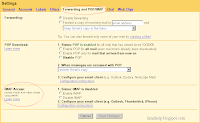
Fig: My Gmail settings show the IMAP in the Forwarding email tab section.

If you are opting for IMAP, there are a few things to keep in mind. Them being the actions you take in your email client and their effects in your Gmail account . Here is a table of what you can expect when you take certain actions in your email client.

Action on mobile device/client (e.g. iPhone/Outlook) Result in Gmail on the web
Open a message Mark a message as read
Flag a message Apply a star to the message
Move a message to a folder Apply a label to the message
Move a message to a folder within a folder Apply a label showing folder hierarchy ('MainFolder/SubFolder')
Create a folder Create a label
Move a message to [Gmail]/Spam Report a message as spam
Move a message to [Gmail]/Trash Move a message to Trash
Send a message Store message in Sent Mail
Delete a message Remove label from the message, or delete the message permanently if the message is already in the Spam or Trash label

[Source: Gmail FAQ]

Lastly I wonder where this puts the other major free email providers like Yahoo and Microsoft's New Hotmail which let alone do not provide IMAP but also fall short on numerous other features which are standard in Gmail. As of now Yahoo is the most used email service in the world but if Google would have its way, this is going to change in the near future.